
Building JobLab on AWS Fargate
Explore the live JobLab dashboard, then inspect the Python, Docker, Terraform, ECS Fargate, S3, and Supabase pipeline that rebuilds its optimization-focused dataset each day.
Written in August 2026. Job totals and costs below are snapshots from then.
Start with the deployed result: explore the live JobLab dashboard. Then return here for the code path that produces it.
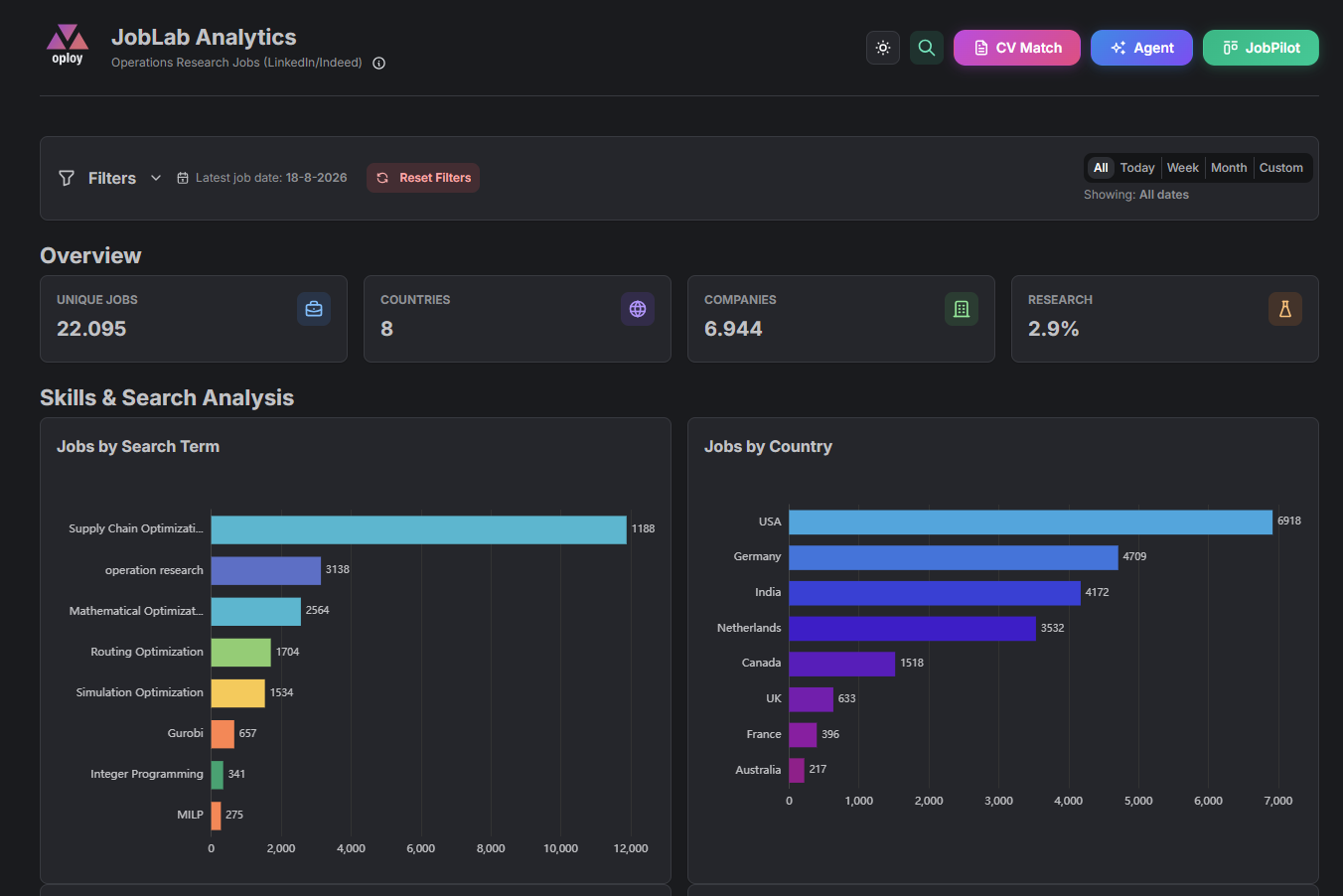
The dashboard is the observable output of a daily data build. Its charts query standardized records rather than raw scraped pages. A posting passes through source collection, cleaning, taxonomy mapping, skill and tool extraction, an S3 snapshot, a Supabase upsert, and database deduplication before it appears in the interface.
The totals in these screenshots are snapshots because each scheduled run can add or remove records. Use the live dashboard for the current dataset, and use the repository to understand how each field was produced.
My instance uses optimization-specific retrieval rules
The pipeline is reusable, but this deployed instance reflects my own search. In 1- Scrapped Data/job_scraper.py, FILTER_KEYWORDS_TITLE casts a broad net with terms such as optim, operations research, supply chain, routing, scheduling, decision science, data scientist, and solver.
FILTER_KEYWORDS_STRONG then checks descriptions for higher-precision terms such as linear programming, mixed integer, MILP, Gurobi, CPLEX, OR-Tools, Pyomo, vehicle routing, stochastic optimization, and demand planning. FILTER_KEYWORDS_NEGATIVE rejects title matches for unrelated uses such as SEO, sales optimization, and marketing optimization.
These are my domain choices, not built-in JobLab requirements. To build another instance, replace the title, strong, and negative keyword lists; update src/config/skills_reference.json and src/config/tools_reference.json; then review the taxonomy mappings in 3- Enrichment + Standardization/taxonomy_standardization.py.
One container runs the complete daily build
EventBridge starts an ECS Fargate Spot task at 02:00 UTC. The container entrypoint is src/orchestrate/run_weekly.py. It creates fresh stage databases, runs the scraper, preprocessing, and enrichment scripts as subprocesses, uploads an atomic snapshot to S3, upserts normalized rows through the Supabase REST API, removes duplicates, records stage counts, and exits.
Runtime behavior comes from environment variables such as SCRAPE_COUNTRIES, SCRAPE_MAX_JOBS, DAYS_BACK, S3_BUCKET, SUPABASE_URL, and DRY_RUN. AWS credentials and service keys are supplied through SSM Parameter Store. Terraform provisions ECR, ECS, IAM, CloudWatch Logs, the schedule, and the task definition.
 One scheduled container, three downstream consumers.
Inspect each deployable component on GitHub
JobLab is split by runtime responsibility. The repositories below contain the source and configuration discussed here.
- Daily data pipeline: Inspect the six-stage Python pipeline, SQLite stage files, relevance filters, skill and tool vocabularies, Supabase exporter, Docker image, Terraform, and scheduled Fargate task. This is where you replace my optimization-specific retrieval rules.
- Analytics dashboard: Inspect the Next.js, TypeScript, Mantine, ECharts, Zustand, and Supabase frontend that turns standardized records into linked filters, charts, heatmaps, and job-level results. I wrote it up in building the JobLab analytics frontend.
- AI agent API: Inspect the FastAPI and Mangum API on AWS Lambda, the Bedrock tool-calling loop, structured and semantic retrieval, CV matching, MLflow traces, evaluation, and prompt optimization. The tracking server is described in deploying MLflow on Railway.
- Lakehouse version: the same dataset as a PySpark Bronze, Silver and Gold pipeline, reproduced in Databricks Delta Lake.
Build analytical fields from noisy text
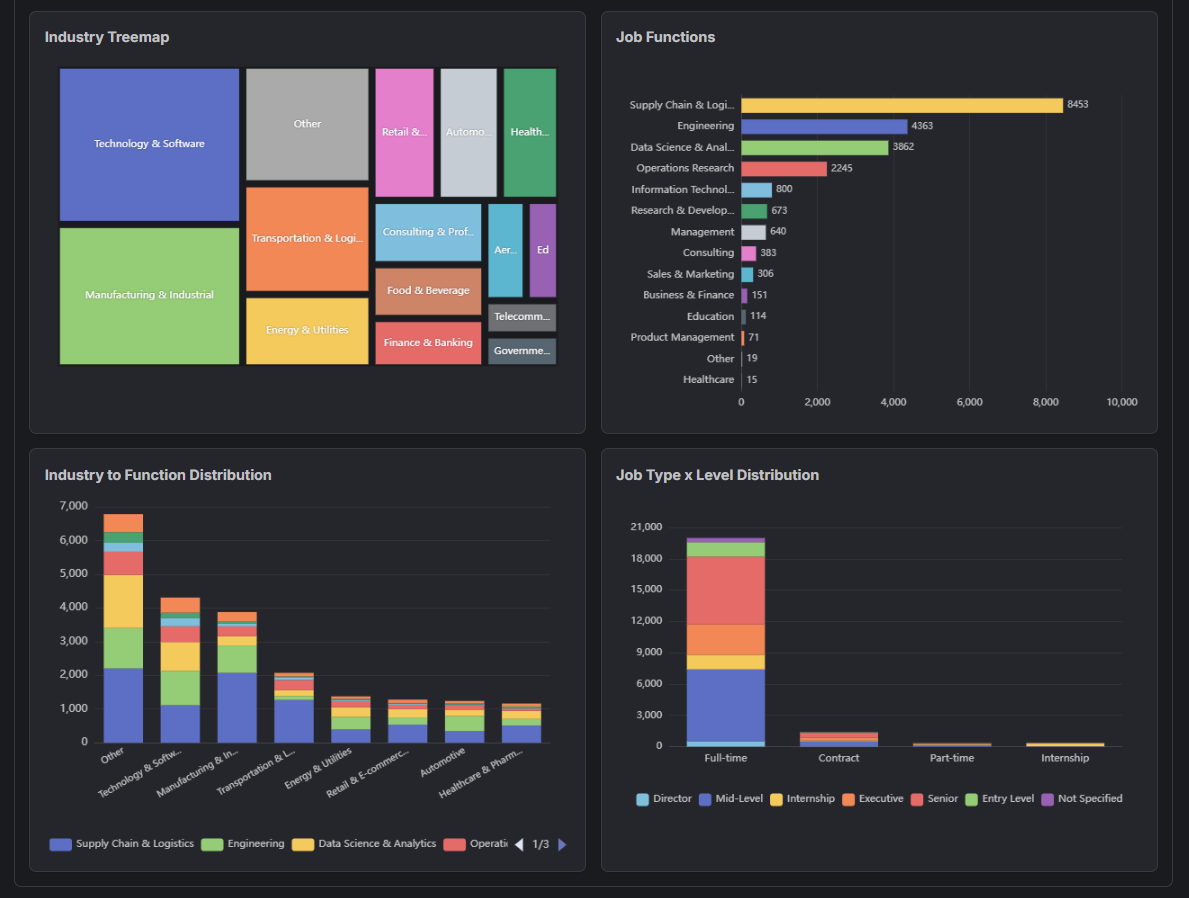
Job titles alone are unreliable. A relevant role may be called Decision Scientist, Supply Chain Analyst, or Applied Scientist. The enrichment stage assigns standardized job function and industry values, detects language and education signals, and extracts skills and optimization tools from the description.
The controlled vocabularies live in src/config/skills_reference.json and src/config/tools_reference.json. Extraction code under src/analysis/skill_extraction/ keeps tools such as Gurobi, Pyomo, OR-Tools, and CPLEX separate from general skills. The dashboard can then group records consistently while preserving the original title and description for verification.
Validate aggregates against source records
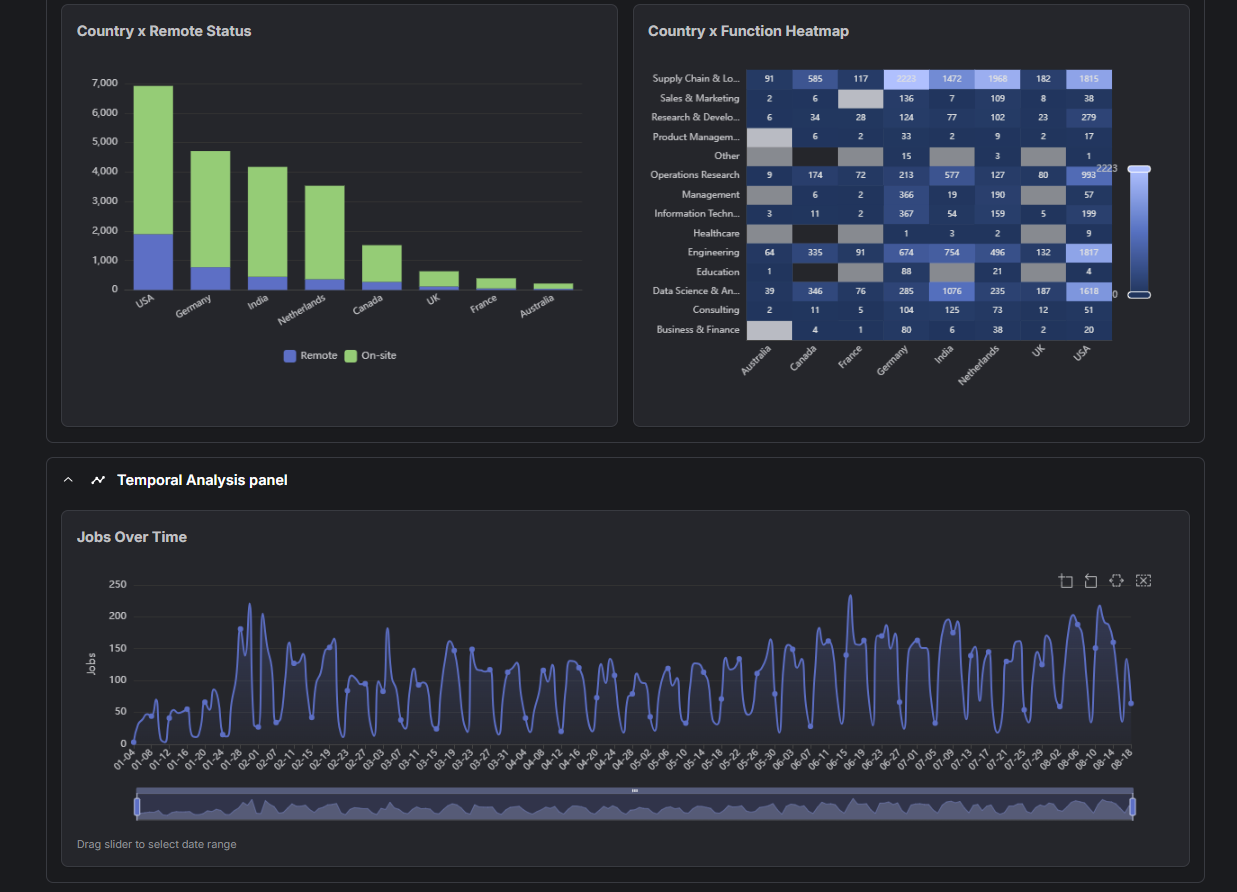
The time series and country-by-function heatmap are useful because both respond to the same filter state. When a group changes unexpectedly, I can drill into its postings and check the original source, title, taxonomy, and extracted terms. This turns the frontend into a data-quality tool as well as a presentation layer.
Inspect the current trends in JobLab.
Match the compute model to the workload
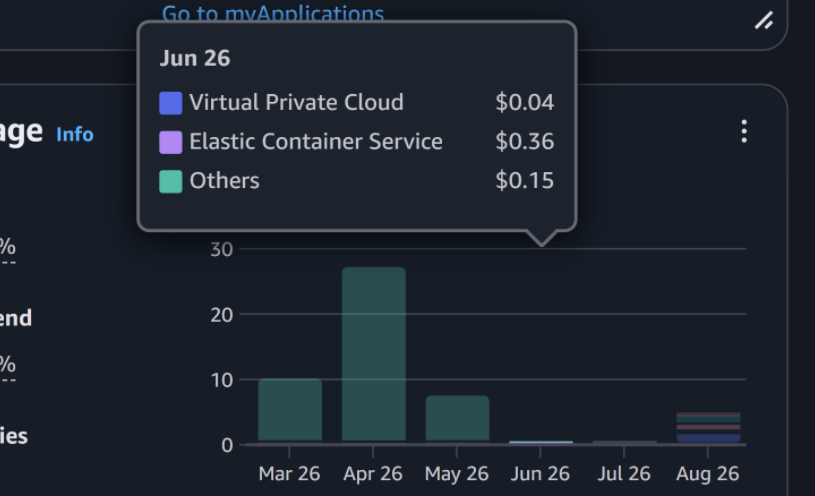
The table is a snapshot of my AWS bill for June 2026. It is not a fixed monthly price, and it will change with workload and AWS pricing.
| Service | June 2026 |
|---|---|
| Elastic Container Service (Fargate Spot) | $0.36 |
| Virtual Private Cloud | $0.04 |
| Other | $0.15 |
| Total | $0.55 |
The batch runs for a few minutes and exits, so an always-on server would waste idle compute. Fargate runs the scheduled container, Lambda handles request-response AI traffic, and the frontend is deployed separately. Each component uses a runtime suited to its execution pattern.
Infrastructure work is larger than the compute bill
The first deployment required an ECR repository, image build and push, ECS cluster and task definition, execution and task IAM roles, CloudWatch log group, SSM parameters, networking, and an EventBridge schedule. Terraform makes those resources reproducible, but it does not remove the need to understand their permissions and failure modes.
Secrets belong in SSM Parameter Store and deployment environments. After terraform apply and the image deployment, scripts/run-manual.sh can trigger a test task and aws logs tail /ecs/joblab-pipeline --follow can verify every stage before the daily schedule is trusted.
Reuse the right level
Use JobLab Analytics to inspect my deployed optimization-focused instance. Use JobPilot My Job Search (sign-in required) when you want a personal search with your own keywords and no infrastructure deployment. Fork the data-pipeline repository when you need control over sources, countries, relevance rules, taxonomies, storage, and scheduling.
How to repeat this
- Fork joblab-data-pipeline.
- Replace the three keyword lists in
1- Scrapped Data/job_scraper.pyand the vocabularies insrc/config/skills_reference.jsonandsrc/config/tools_reference.json. - Put AWS credentials and service keys in SSM Parameter Store, never in the repository.
- Run
terraform apply, then build and push the image to ECR. - Trigger one task by hand with
scripts/run-manual.shand follow its logs:
aws logs tail /ecs/joblab-pipeline --follow
- Only trust the 02:00 UTC schedule after one manual run has passed every stage.
One thing to check first: terraform/variables.tf names the log group /ecs/joblab-pipeline, while scripts/run-manual.sh prints /ecs/joblab. Use the name Terraform created.
For a smaller service on a simpler platform, see how I deployed FastAPI on Railway.