
My old laptop became a Linux server
What I learned running websites, APIs, databases and small experiments on an 8 GB Core i5 laptop, managed from Windows.
I had an older Huawei laptop with 8 GB of RAM and a Core i5 processor. I installed Ubuntu Server on it, and gradually moved useful services onto it. It now stays on day and night while I work from my Windows laptop.
I started this setup in September 2026. The service inventory and RAM measurements below were checked in October 2026.
There was no big plan to build a home data centre. I wanted to see how much useful work a computer I already owned could do.
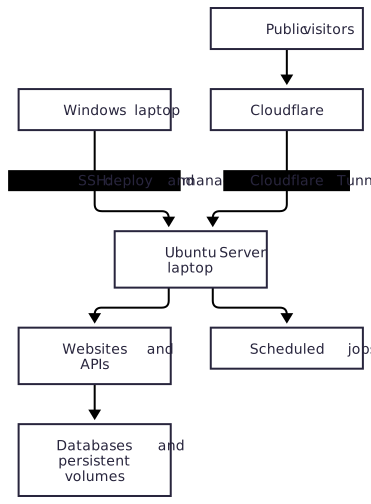
What actually runs on it
The processor is an Intel Core i5-10210U, with four cores and eight threads. Ubuntu reports about 7.5 GiB of usable RAM. On 8 October 2026, the machine had been up for 28 days and nine hours, with 28 running Docker containers.
Here is one RAM snapshot, taken at about 23:36 Amsterdam time that evening. Each application row includes its supporting containers, including its database where applicable. MiB means mebibytes.
| Service | Public address | What I use it for | RAM in this snapshot |
|---|---|---|---|
| Oploy website | www.oploy.eu | Django/Wagtail website and PostgreSQL | 147 MiB |
| Oploy Notes | notes.oploy.eu | This static notebook, served by nginx | 8 MiB |
| JobLab | or.oploy.eu/dashboard | Operations research job dashboard, PostgreSQL, PostgREST and API proxy | 198 MiB |
| AI engineering jobs | aieng.oploy.eu/dashboard | AI, ML and data science job dashboard and its own database stack | 163 MiB |
| Lang App | lang.oploy.eu | Language learning, audio processing, API, web app, PostgreSQL, Redis and proxy | 681 MiB |
| JobPilot personal search backend | JobPilot My Job Search API: jobsearch-api.oploy.eu/health | Search API, PostgreSQL, PostgREST and proxy | 170 MiB |
| Inventory simulation | siminv.netlify.app API: api-siminv.oploy.eu/health | Run inventory simulations | 18 MiB |
| Inventory optimization | simopt.netlify.app API: api-simopt.oploy.eu/health | Search for inventory policies using simulation | 50 MiB |
| Repair-shop scheduling | opt.oploy.eu API: api-scheduling.oploy.eu | Optimization API for scheduling experiments | 70 MiB |
| Self-hosted Convex stack | Used by JobPilot | Backend, database and dashboard; JobPilot’s frontend is hosted elsewhere | 693 MiB |
| Portainer | Private administration | Manage Docker containers, logs, images and volumes | 21 MiB |
For the three optimization projects and JobPilot, the website itself is hosted elsewhere (Netlify for the optimization apps). The laptop runs the API behind it, which is why each row has two links.
The scraper runs on a schedule, so its temporary container is not included in these always-running figures. Cloudflare Tunnel is a host service and used about 42 MiB of resident memory separately.
These are observed use, not memory limits or peak requirements. Audio work, scraping and optimization can need much more. The language worker was active during the measurement, so this is not a strict idle benchmark.
The host reported about 3.2 GiB used and 4.3 GiB available, with about 0.82 GiB in swap. Linux also uses RAM for caches. Container figures do not add up to the whole operating system’s memory use.
A separate place to run things
One benefit is simple: I can close my Windows laptop and the services keep running. My working computer and the server have different jobs.
Docker gives each application its own dependencies, network and persistent storage. A Python virtual environment is also useful for a small script. I can try a deployment without filling my Windows machine with another database and another background process.
This is the separation I wanted from a virtual environment. Containers share the Linux kernel; they are not full virtual machines. An experiment can still exhaust the host unless I set limits. For stronger isolation, I would use a VM and budget extra RAM for it.
Ubuntu Server does not run a desktop interface on this machine. That leaves more room for the services, but I did not measure the same workload on Windows before the move, so I cannot give an honest RAM-saving percentage.
It feels responsive for my small workloads. A recorded language-app test processed a roughly three-minute audio fixture in about 28 seconds with four CPU threads. That is one specific test, not a promise that an older laptop can handle every AI workload.
Managing it from Windows
Most of the time I open Windows Terminal, connect over SSH and deploy there. I build an image, start a container, read its logs and check its health endpoint. I do not need to sit at the server’s keyboard.
For a visual overview, I use Cockpit for the operating system and Portainer for Docker. Seeing memory, logs and services in a browser makes small problems easier to understand.
I also added two Cockpit pages for the laptop hardware:
- Battery: charge percentage, AC connection, battery health, cycle count and current power draw. It refreshes every five seconds while visible.
- Display: brightness, screen on/off and the font size on the physical console. These controls need administrative access.
Battery monitoring and charging control are separate. A boot service applies charging thresholds: start below 75%, stop at 80%. The live reading was 79%, with the battery not charging. The dashboard makes the state visible; it does not enforce those thresholds.
I also changed lid and power-button behaviour, and added a lid hook that blanks the display without suspending the server. A third-party Docker Manager page gives me basic container controls inside Cockpit. Portainer remains useful for deeper management.
Moving services from Railway and AWS
I moved the Wagtail website and its PostgreSQL database from Railway on 11 September 2026. The application runs locally in Docker, and visitors reach it through Cloudflare Tunnel. Website media still lives in Cloudflare R2.
The earlier Railway database note describes the setup I moved from.
For JobLab, a systemd timer took over the scheduled scraper job from AWS. Its data now goes through duplicate checks into local PostgreSQL and the dashboard. The deployment record says the AWS schedule was disabled after verification.
I described the original cloud version in the AWS Fargate scraper note.
JobPilot’s personal search backend also moved from Lambda to the server. That required adapting the application and changing frontend endpoints. Moving from serverless hosting involves more than copying a function file.
I did not move every cloud dependency. This is a mixture of local services and external services, which suits me better than making everything local just for the sake of it.
What went wrong, and what I still have to own
Closing a lid must not suspend a server. The default short power-button press also shut this machine down unexpectedly, so I changed it. Keeping the screen dark and leaving the cooling vents clear matter too.
The battery limit was another lesson. The Huawei driver showed the thresholds I had written, but firmware smart-charge mode initially ignored them. I had to verify actual charging behaviour rather than trust a setting that looked correct.
I reused hardware, so the additional hardware cost was zero. Electricity, storage, backups, domain fees, external APIs and my maintenance time still count. I have not measured total monthly savings against AWS and Railway.
Running 24 hours a day is my operating choice, not an availability guarantee. Internet outages, a failed disk or a stopped tunnel can take these applications offline. The battery can keep the laptop alive briefly; it cannot keep the building’s router online.
For small applications and learning, I am happy with this tradeoff. For something that needs stronger availability, I would choose hosting that matches that requirement.
How to repeat this
I wrote a separate step-by-step guide covering installation, Windows SSH access, a first Docker service, migration, and the Cockpit additions. Screenshots of the laptop and dashboard can follow later.
If you have a spare laptop, try one small service first. Check its memory, leave it running, and learn how to restore it. You do not have to move everything to find out whether this is useful for you.